Cloud, on-premise and hybrid PACS at a glance
Cloud PACS uses a remote archive and network access. On-premise PACS keeps the primary archive at your facility. Hybrid PACS combines local image access with a remote service for selected workflows. Products differ in caching, streaming, synchronisation and recovery behaviour, so ask each provider to demonstrate the configuration being quoted.
| Decision | Cloud PACS | On-premise PACS | Hybrid PACS |
|---|---|---|---|
| Where images live | Remote archive; a gateway or local cache may also be present. | Local archive with backups configured separately. | Local archive plus selected remote copies or services. |
| Reading at the centre | Depends on delivery method, connection and caching. | Uses the local server, storage and LAN. | Can use locally available images over the LAN. |
| Remote radiologist | Designed around remote access; verify permissions and tools. | Needs a separately designed secure remote-access path. | Reads uploaded studies through the configured remote service. |
| Internet interruption | New uploads and uncached remote retrieval may stop; offline features vary. | Local image access may continue while server, LAN and power work. | Local images may remain accessible; remote synchronisation waits. |
| Typical budget items | Subscription, storage, transfer, local gateway, support and connectivity. | Software, server, disks, backup, power protection and maintenance. | Local hardware and software plus remote service, storage and connectivity. |
| Recovery responsibility | Agree retention, restore process, service limits and data export with provider. | Assign backup, monitoring and restoration ownership locally or to a support partner. | Document local and cloud recovery, including deletion and retention behaviour. |
| What to test | Peak-hour opening, priors, uploads, remote reporting and export. | Local performance, capacity, hardware failure and restore. | Both local and remote workflows, interrupted uploads and reconciliation. |
No architecture guarantees speed, security or recovery by itself. Compare implementations using the same studies, workstations and network conditions. A cloud viewer with caching or progressive loading can behave differently from a full-study download; an undersized local server can also be slow.
Estimate study storage and upload time
Use a measured average study size from your own archive. CT/MRI size, compression, image count and modality mix can change the result substantially. The calculator estimates image payload only, using decimal MB/GB and a 30-day planning month.
Your workload, in numbers
Formulas: GB/day = studies × MB ÷ 1,000; retained GB = GB/day × 30 × months; ideal upload seconds = MB × 8 ÷ Mbps. Excludes database overhead, backup copies, replication, growth and headroom. This is a planning estimate, not a performance promise or storage quote.
Use upload speed rather than the advertised download speed. A 200 MB study at 10 Mbps needs at least 160 seconds to upload its full payload; actual time includes overhead and contention. Ask whether the reader must wait for the full upload or can begin earlier with that product’s delivery method.
Compare total cost over the same period
For every quote, add subscription or licence fees, storage, local hardware, backups, support, connectivity, migration and data export. State the number of users, workstations, sites, retained studies and remote readers so you are comparing the same scope.
| Selected services | Starting monthly subscription | 36 months at the same starting rate |
|---|---|---|
| Local PACS Server | ₹999 | ₹35,964 |
| Server + cloud access | ₹999 + ₹499 = ₹1,498 | ₹53,928 |
| Server + cloud + AI/dictation | ₹999 + ₹499 + ₹699 = ₹2,197 | ₹79,092 |
These illustrative subscription totals assume unchanged starting rates and continuous monthly use. They exclude applicable taxes, hardware, connectivity, backup costs and any plan changes or additional capacity. Cloud storage and usage allowances must be confirmed. They are not a three-year price guarantee. See current RDx pricing and inclusions.
Which PACS setup fits your reading pattern?
One X-ray centre, mainly remote reading
Start by measuring study size and upload completion. Compare a cloud workflow with any local reception and viewing you need. Demonstrate access during normal working hours and after a connection interruption.
See the X-ray PACS workflow →CT/MRI centre with an on-site reader
Prioritise representative stack navigation, priors and reconstruction tools on the actual workstation. A local or hybrid image path may suit the workflow; validate remote delivery separately if after-hours cover is needed.
Plan an imaging-centre setup →Several branches with central reporting
Check branch uploads, study assignment, access separation and status visibility. Model the combined archive and simultaneous upload load before choosing retention and connectivity.
Explore diagnostic chains →Hospital with an existing archive
Include migration, departmental access, legacy retrieval, backup restoration and support responsibilities. Use a phased acceptance plan that covers both normal operation and failure recovery.
Explore hospital PACS →How RDx separates local settings and cloud options
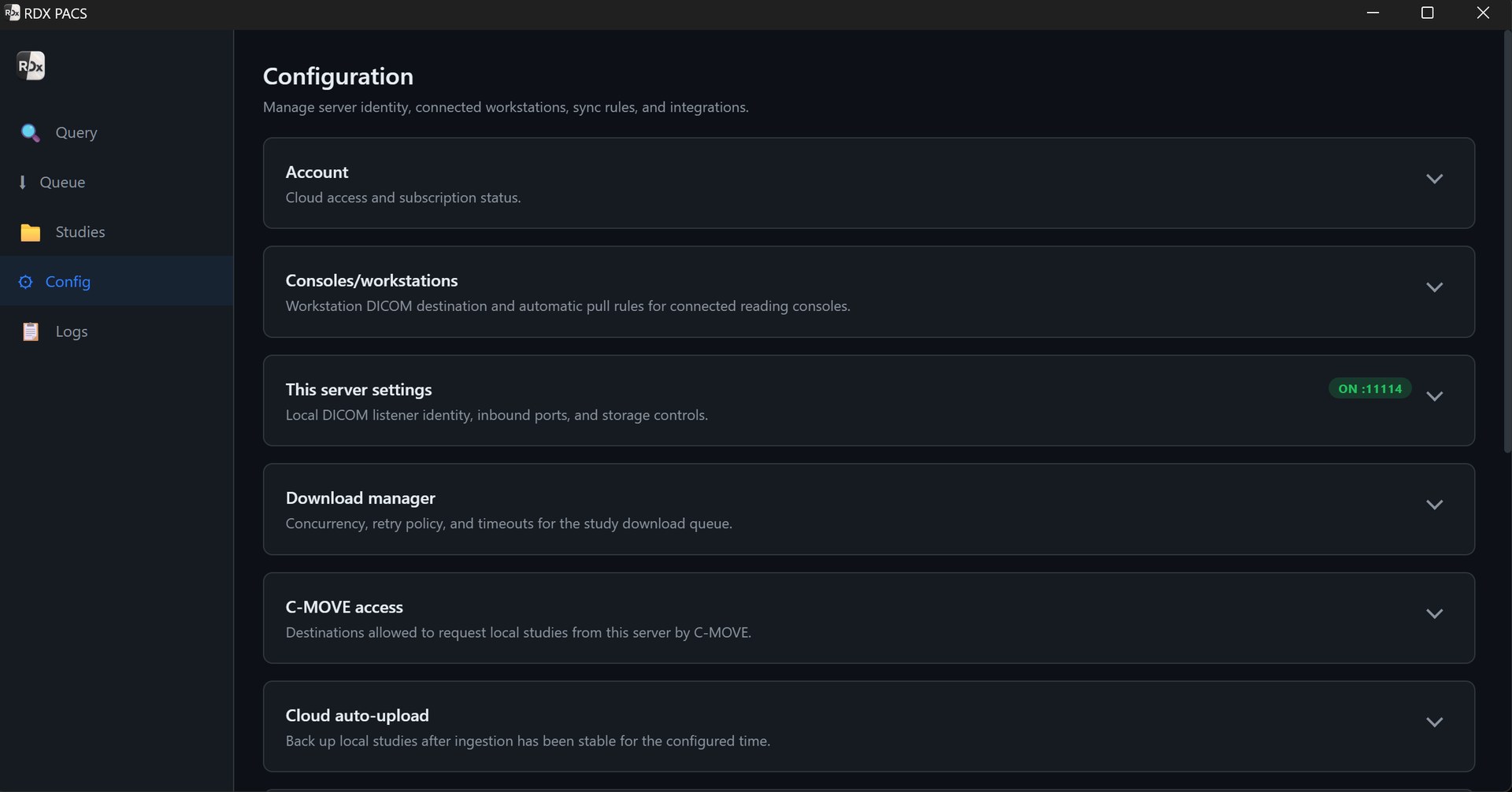
The RDx PACS server interface below exposes local DICOM server settings, connected workstations, retrieval access and cloud auto-upload configuration. The image shows the controls; the selected plan and configuration determine what is enabled. Optional cloud access does not remove the need to size or protect local storage.
Security and recovery questions for every quote
- Where are studies stored, who can access them, and how are user permissions managed?
- Which data is encrypted in transit and at rest in the proposed setup?
- How are changes, access and report actions recorded, and what can your team review?
- What happens to each copy when a study is deleted or a subscription ends?
- Who restores data after a disk failure, accidental deletion or cloud outage, and how is that tested?
- How can you export your images and reports, and what are the associated limits or charges?
Record the answers for your actual configuration. A second copy of an image is useful, but a recovery plan also needs retention, access, restoration steps and assigned responsibility.
Questions before choosing PACS
Is cloud PACS always slower than on-premise PACS?
No. Performance depends on study size, network conditions, server and workstation capacity, and how images are cached or delivered. Compare the same studies and tools under the conditions your team will use.
Can on-premise PACS support remote reading?
Yes, if a secure remote-access solution is designed and configured. Confirm how readers connect, which images are available and who maintains the access path.
Does hybrid PACS work without internet?
Local image access may continue for studies on the functioning local server and LAN. Cloud synchronisation, remote retrieval and cloud-dependent services require connectivity. Test the required outage behaviour on your configuration.
Which is cheaper: cloud or on-premise PACS?
There is no universal answer. Compare the same workload and period, including software, hardware, storage, backups, support, connectivity, migration and exit costs. The examples on this page cover only RDx starting subscriptions.
Does cloud mirroring guarantee backup recovery?
No. Confirm retention, deletion behaviour, independent recovery access and the restore process. Test recovery rather than assuming that mirroring alone provides the backup policy you need.
Plan the setup around your centre.
Tell us your modalities, study volume, retention needs and where your radiologists read. We’ll help confirm hardware, connectivity and the services you need.
Discuss my PACS setupProduct information is supplied by Tanj Itech Private Limited. Screenshots show the product interface; available services and allowances depend on the selected plan. Review current pricing.